Showing posts with label customize ubuntu. Show all posts

Sunday, November 20, 2011

Install and Configure Burg in Ubuntu 11.10

This is a tutorial about installing burg and configuring it for ubuntu 11.10 and 10.04. It might work on other versions and other distributions too.


First we need to install burg by entering those 3 lines:
sudo add-apt-repository ppa:n-muench/burg 
sudo apt-get update
sudo apt-get install burg burg-themes
when installing for the first time burg will show you the above window
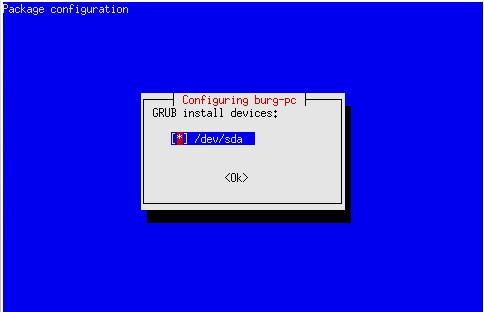
 here you must press  
SPACE and then Enter. 
after this finish installing burg.
Installing Burg Manager
"burg manager" is a program in which you can add themes for burg and couple options for managing burg.
To install burg , you have to install BUC  from here http://buc.billeragroup.net/?page_id=15
just install the .deb file by double clicking it, this will open the Ubuntu software center, in the software center press install, there will be a massage , press ignore !!!!!!!
after installing buc, install "Burg Manager" from here http://gnome-look.org/content/show.php/Burg-manager?content=127497
just download the .deb file and then install it with the software center and choose ignore in the massage.


This is some text after the last picture

Monday, September 5, 2011

Change window control buttons position

In ubuntu 11.04 I found a very easy and powerful tool to do this task and its called "Ubuntu Tweak", You can download this program from http://ubuntu-tweak.com/
After installing it you will find the launcher at "Applications->System Tools->Ubuntu Tweak"
Then you need to go to "Window Manager Settings" and change the layout of the window buttons. Thats it !

Screenshot of ubuntu tweak


The other way to accomplish this task is much more complicated and it involves using the not so user friendly "gconf-editor", then you go to "Apps->Metacity->General" and double click "button_layout" and change it to "menu:maximize,minimize,close" and that's should do the trick.
I prefer using the "Ubuntu Tweak" because it lets me to do much more with my OS, like configure compiz and clean the cache, add edit and remove sources, change the menu behavior and much more.
Overall this program is perfect for tweak and maintenance of you ubuntu os!

If you found this post helpful or you have something to add, please leave a comment !